.png)
How works denomination in POS?
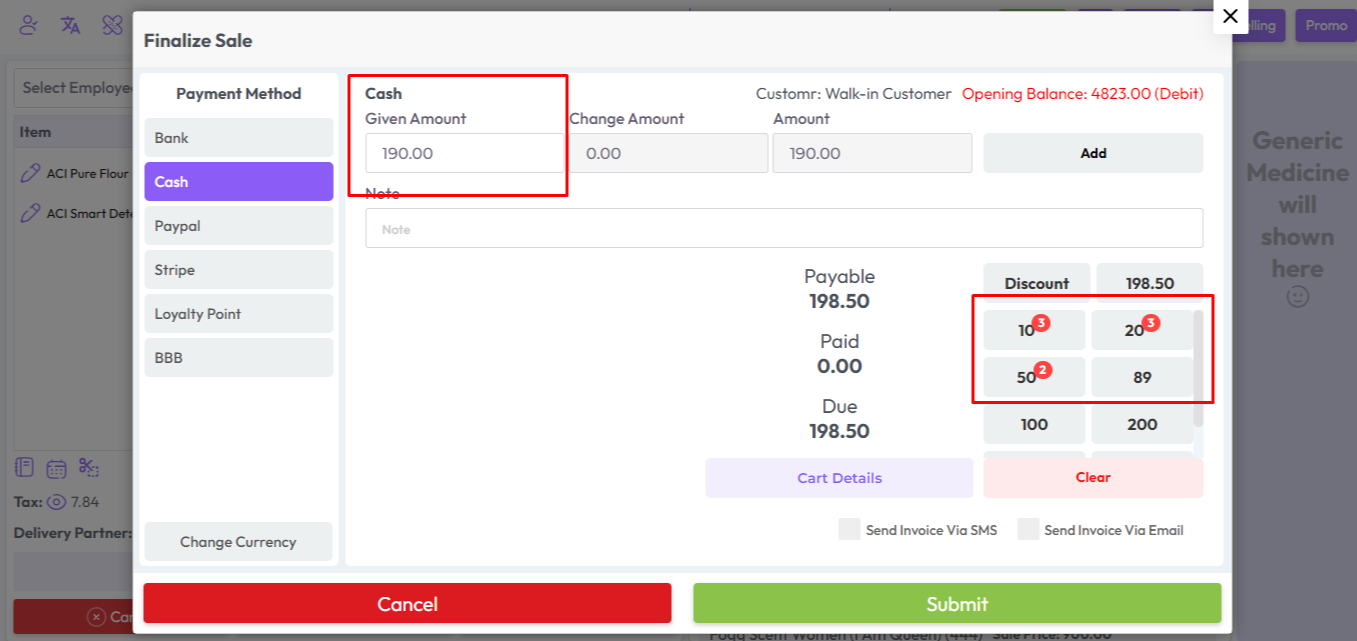
When you come to the "Finalize Sale" model you will see the following interface, in this section you will see a Denomination section.
Here in this snapshot shown below number 10 clicked 3 times means 10 * 3 = 30, number 20 clicked 3 times means 20 * 3 = 60, number 50 clicked 2 times means 50 * 2 = 100 so result is 30 + 60 + 100 = 190. Clicking on the denomination number will display the total sum of the denomination in the Amount field. This is how denominations work.
This amount will be add in payment method section by clicking "Add" Button
Was this page helpful?
Thank you for your feedback!
Please Login First
Zimozo - Support Ticketing, Knowledgebase, Live Chat and CRM
Comments (00)