Zimozo ERP Documentation

System is looking for solutions in Knowledgebase, Blogs, AI, and other places

Zimozo Opening Stock

To add opening stock:

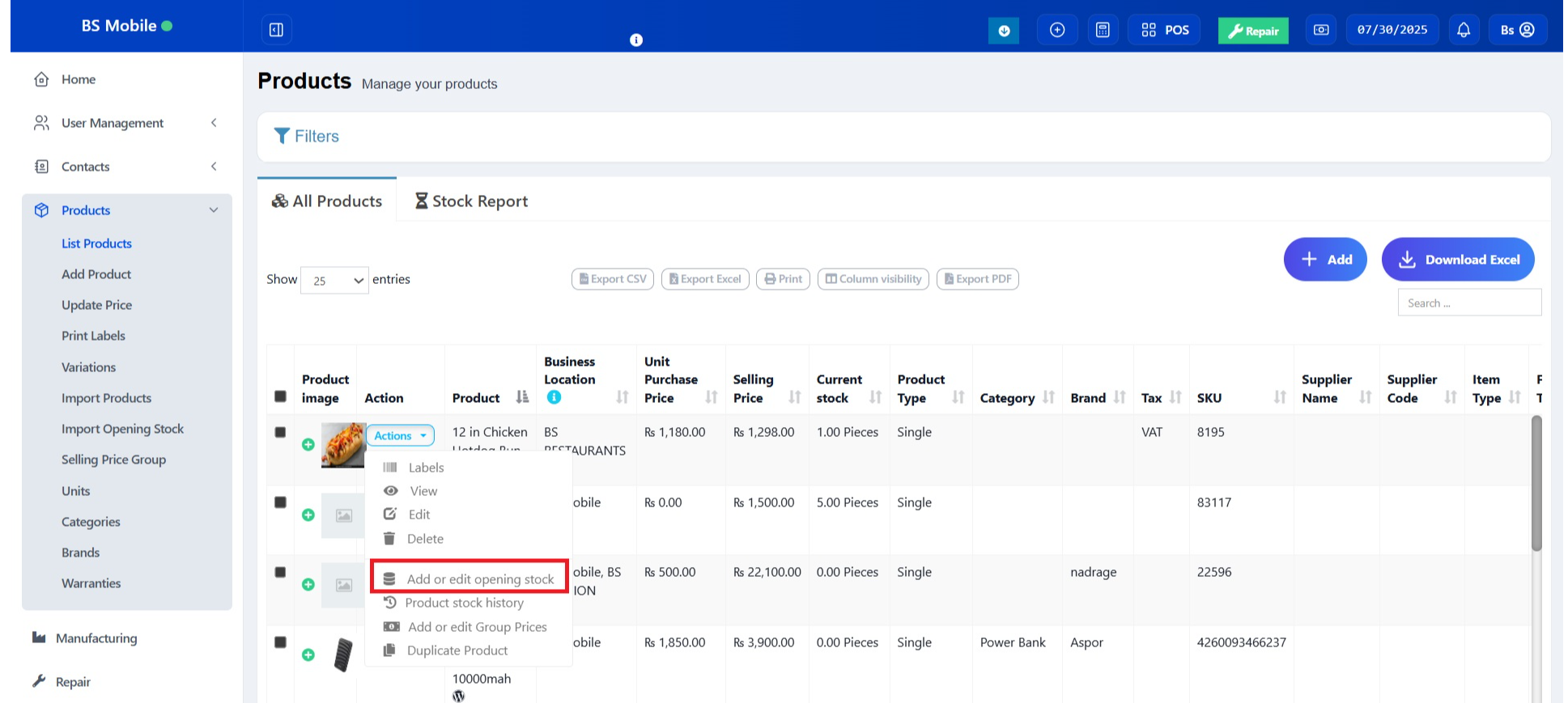
  1. Go to List Products
  2. Actions > Add or Edit Opening Stock

Editing opening stock (or) Making opening stock 0:

NOTE: If you have already added an opening stock and have to edit it, follow the steps below.

  1. Click the ‘+’ symbol.
  2. A new row will be created
  3. Add the new amount there

To make the opening stock to ‘0’, add a negative value in step 3

Eg) If the existing opening stock is 10, add -10 to make the stock quantity to 0 or if you add a negative amount (-4) then the amount will be 6.


Was this page helpful?

Thank you for your feedback!

Comments (00)

Leave a comment

Sign in to post your comment or Sign Up if you don't have any account.

Ai Replying

Zimozo - Support Ticketing, Knowledgebase, Live Chat and CRM

Get In Touch

Need More Help