.png)
While adding shipment details during a sale, the delivery person can also be added.
NOTE: This feature is available in ZimozoPOS version 5.2 and above
To add a delivery note, follow the steps below.
Step 1: While adding the sales, be sure to include shipping details (You can refer to the video guide provided below for assistance).
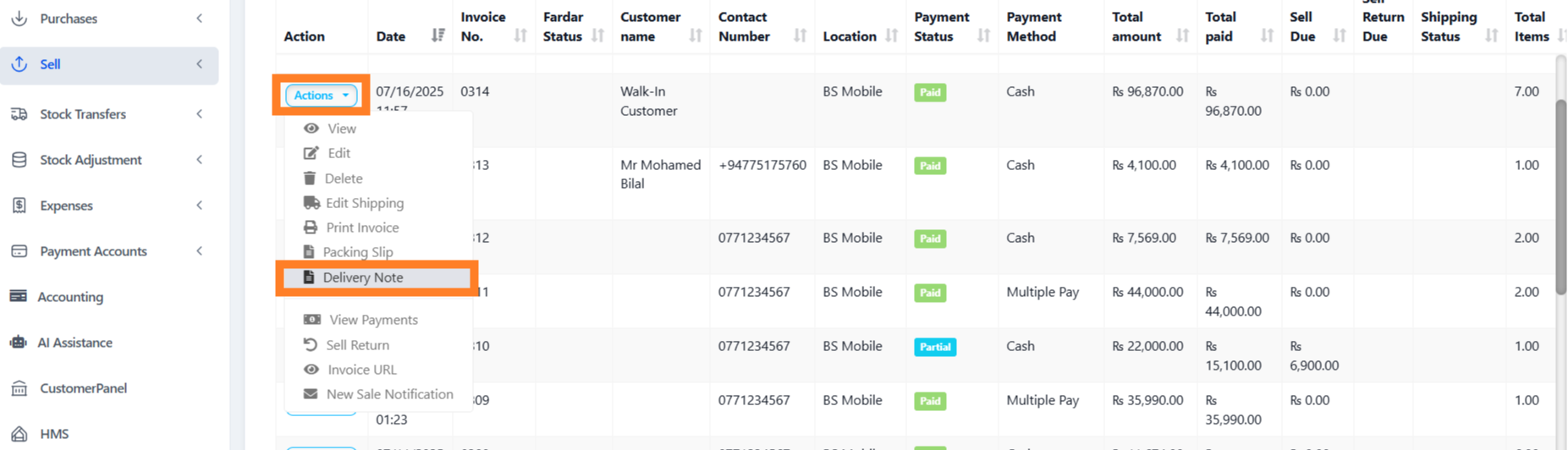
Step 2: Navigate to the All Sales screen and click on the Action dropdown menu for the specific sale added in Step 1.
Step 3: From the Action dropdown menu, select the ‘Delivery Note‘ option, and proceed to print the delivery note directly.
Was this page helpful?
Thank you for your feedback!
Please Login First
Zimozo - Support Ticketing, Knowledgebase, Live Chat and CRM
Comments (00)